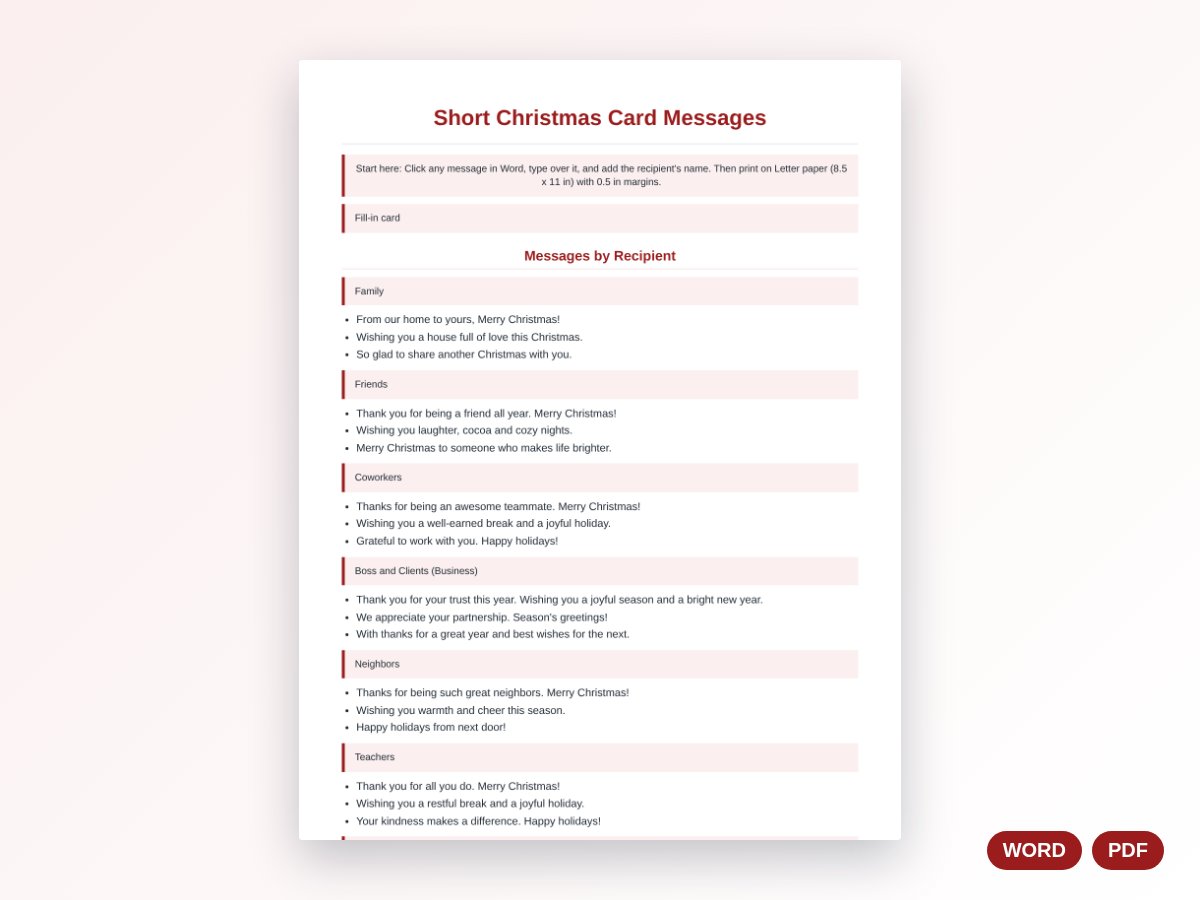

Free Short Christmas Card Messages Template (Word and PDF)
Need short messages for a long card list? Download a free Short Christmas Card Messages template in Word or PDF. Each file sorts quick, print-ready lines by who you're writing to and includes a fit and tone guide so your words sit neatly inside the card. Edit the Word version with your own names, or print the PDF and start writing.
Free short Christmas card message templates to download
Classic Red
A traditional red and cream message sheet with a serif font, ideal for family, neighbors and formal business cards.

Free download: Download Word (.docx) · Download PDF
Fresh Green
A clean, modern green layout with a sans-serif font, great for friends, teachers and small business owners printing many cards.

Free download: Download Word (.docx) · Download PDF
What's in the template
Both designs open with a set of short Christmas card messages sorted by recipient, and both finish with a fit and tone guide, tone tips, and print and fold notes. Classic Red keeps things simple and traditional. Fresh Green adds a few extras that help when you're writing lots of cards.
Here's what you'll find in Fresh Green:
- A fill-in card block with a To line for a name or company, a Merry Christmas greeting, a one to three line message, a "Warmly," sign-off and a From line.
- Messages by recipient, grouped into tables for family, friends, coworkers, boss and clients (business), neighbors, teachers, religious, funny and kids. Think lines like "From our home to yours, Merry Christmas!" for family or "Rejoice in the miracle of Christmas" for a religious card.
- Mixed-audience and late-December lines such as Happy Holidays and Season's Greetings.
- Sign-off ideas so you're not stuck after the message.
- A fit and tone guide with a table showing card size, best message length and an example, so your text fits the inside panel.
How to use it
- Pick your format. Download the Word file if you want to edit, or the PDF if you'd like to print it as is and handwrite your notes.
- Make it yours. In Word, click a message, type over it, and add the recipient's name or your company name in the To line.
- Print it right. Use Letter paper at 100% scale and keep to 0.5 in margins so your home printer doesn't clip the edges. The print and fold notes in the file walk you through it.
- Fold or paste. Fold the sheet in half to make a simple card, or copy your favorite lines into one of our free Christmas card templates. Writing a longer letter to go with it? Pair it with our Christmas stationery and letterhead.
Choosing the right tone
Short messages work best when they suit the person reading them. A few easy rules:
- Mixed groups: Pick Happy Holidays or Season's Greetings so no one feels left out. Cards going to a big audience do best with simple wording.
- Coworkers and clients: Keep it friendly and simple. A thank-you plus a holiday wish works well, like "Thanks for being an awesome teammate. Merry Christmas!" Business cards often pair gratitude with a look ahead to the coming year. Skip humor and religious lines unless you know the person well.
- Close friends and family: This is where the funny lines shine.
- Late-December cards: Running behind? Mention the New Year instead of Christmas. The late-December lines in Fresh Green are made for exactly this.
Common questions
Is it free?
Yes. Every template on XmasTemplates is free to download, with no subscription needed.
Can I use it for business cards?
Yes. Shops, restaurants and offices can use the boss and clients lines and add a company name in the To or From field.
How long should a message be?
Aim for about 20 words on a small card and up to 35 words on a standard 5 x 7 in card. The fit and tone guide in each file gives examples for each size.
Can I add my own wording?
Of course. The Word file is fully editable, so you can change any line, mix and match messages, or write something brand new.
Can't find the style you want?
Use our Ask for a Template form and tell us what you need. Happy writing, and Merry Christmas!